🧱 Breaking the Monolith: A Practical, Step-by-Step Guide to Modularizing Your Android App — Part 2
implementing repository patterns, DI setup, and clean boundaries

In Part 1, we discussed the benefits of modularization, created a blueprint and high-level plan, centralized Gradle configurations, and built our first feature module :feature-bookmarks. That gave us a stable foundation.
Now it’s time to handle something just as critical: implementing repository patterns, DI setup, and clean boundaries. We are going to create core data modules such as :core-domain, :core-data, etc.
Why Core Data Modules & Dependency Injection Matter
Dependency Rule: Features depend on abstractions (domain interfaces), not concretions (data implementations).
DI for Decoupling: Hilt will provide dependencies, making components easier to manage and test.
Stable contracts: Features should rely only on domain interfaces, not implementations.
Testability: Mock repositories in feature tests without touching real databases or APIs.
Separation of concerns: Each module has a distinct responsibility.; Data source churn (Room, Retrofit, gRPC, etc.) stays isolated.
Planning and Thought Process
We’ll build this from the “contract” outwards to the “consumer,” ensuring that each layer only knows what it needs to.
Phase 1: Defining the Contracts (:core-domain). Before we can talk about how data is fetched or stored, we need to define what data we’re dealing with (models) and what operations can be performed on it (repository interfaces). This layer is pure Kotlin and forms the stable foundation.
Phase 2: Implementing the Contracts (:core-data). With contracts defined, we now build the “engine room.” This module knows how to actually get and store the data. It implements the interfaces from :core-domain and handles all data source specifics and its own DI setup.
Phase 3: Consuming the Contracts (New Feature Module — e.g., :feature-home or :feature-image-list). Now we build a feature that uses the data, but only through the abstractions defined in :core-domain. This demonstrates the clean separation and how DI wires everything together.
Phase 4: Wiring and Verification (:app and Testing). Ensure the application’s DI graph is correctly configured and showcase the testability benefits.
Phase 5: Documentation & Future Scaling. Solidify the learnings and create a repeatable process.
Why this order and approach?
Contract-First: Ensures stability. The “what” (domain) is less likely to change frequently than the “how” (data).
Clear Boundaries: Enforces that feature modules are completely decoupled from data implementation details.
DI from the Bottom Up: The module that owns the implementation (:core-data) is responsible for providing its Hilt bindings.
Practical Demonstration: Using a real (or realistically faked) data flow makes the benefits tangible.
Iterative: While comprehensive, we can start with very simple implementations (e.g., hardcoded data in ImageRepositoryImpl) and then progressively add real network/DB calls.
Question: Should I create the feature module first, then create core modules?
Answer: Not recommended.
For a project aiming for a scalable and maintainable modular architecture, it’s generally best practice to create (or at least define the interfaces for) your core modules as you modularize features that will depend on them.
This avoids the circular dependency trap because the codes in the feature module might need dependencies from the app module, also it leads to a cleaner, more robust structure sooner.
:Core-domain module
:core-domain module is (and should be) a pure Kotlin library. It does not have access to the Android SDK (e.g., Context, Log, Parcelable from android.os, Android-specific annotations like @Parcelize if it’s the Android one).
Step 1: Create :core-domain module in the root of the project
Step 2: Move files from the domain package in :app module to :core-domain module.
- Image.kt in domain/model package. We removed any Android-related codes, Parcelable, and
@Parcelizebecause this module should be a pure Kotlin library.
package com.vsay.pintereststylegriddemo.core.domain.model

data class Image(
    val id: String,
    val author: String,
    val url: String,
    val width: Int,
    val height: Int,
    val downloadURL: String
)
ImageRepository in the domain/repository package.
We removed Pager from androidx.paging.Pager which is part of the Android Jetpack Paging library.
From the Paging 3 library, we can use androidx.paging:paging-common artifact that is pure Kotlin and contains PagingData .
The Pager class itself often lives in the data layer (:core-data or even ViewModels if the PagingConfig is dynamic).
We add androidx.paging:paging-common to libs.versions.toml file and include it in core-domain/build.gradle.kts. We don’t add this dependency in KotlinLibraryConventionPlugin.kt because this is only use in core-domain only (as of now).
interface ImageRepository {
    fun getPagedImages(): Flow<PagingData<Image>>
    suspend fun getImageById(id: String): Image?
}
- GetImageUseCase and GetImageByIdUseCase in domain/usecase package
class GetImagesUseCase(private val repository: ImageRepository) {
    operator fun invoke(): Flow<PagingData<Image>> {
        return repository.getPagedImages()
    }
}
class GetImageByIdUseCase( // @Inject removed
    private val repository: ImageRepository
) {

    uspend operator fun invoke(id: String): Image? {
        return repository.getImageById(id)
    }
}
Integrate :core-domain Interfaces into :app module
Add :core-domain Dependency to :app by adding implementation(project(“:core-domain”)) to app/build.gradle.kts.
Go through the usage of each file in the domain package of the app module and replace those usage using files from :core-domain module instead
You should be able to remove the domain package from the app module and run the app
Note:
Make sure you replace the file from :core-domain with the right import
Add missing binding for GetImageByIdUseCase to AppModule.kt in di package
object AppModule {

  // other codes


  @Provides
  @Singleton
  fun provideGetImageByIdUseCase(repository: ImageRepository): GetImageByIdUseCase =
     GetImageByIdUseCase(repository)
}
:Core-data module
The goal here is to move the actual data handling logic (network calls, mapping, repository implementation) out of :app and into a new, focused module called :core-data.
Differences between :core-data and :core-domain
:core-domain refer to the “What” and “Business Rules” layer
Defines the business logic and core entities of your application.
Answers “What are the fundamental objects?” and “What are the rules and operations around them?”
It is the heart of your application’s logic, independent of how data is displayed or sourced.
:core-data refer to the “How” and “Data Handling” layer
Responsible for implementing the data operations defined by the repository interfaces in :core-domain.
Handles all interactions with actual data sources (network, database, local cache, files).
Answers “How and where do I get/store the data?”
+-----------------+       +-----------------+       +-----------------+
|  :app / Feature |------>|  :core-domain   |<------|   :core-data    |
| (UI, ViewModels)|       |  (Interfaces,   |       | (Implementations|
|  depends on     |       |   Models,       |       |  DTOs, Mappers, |
|  :core-domain & |       |   Use Cases)    |       |  ApiService,    |
|  :core-data (DI)|       +-----------------+       |  Hilt Module)   |
+-----------------+                                 +-----------------+
Feature modules (like :app) depend on :core-domain for contracts and business logic.
:core-data depends on :core-domain to implement those contracts.
Feature modules get implementations from :core-data via Dependency Injection (Hilt), but ideally, they only reference the interfaces from :core-domain in their code.
This separation makes your app more modular, testable, and maintainable.
Hilt in :app and :core-data modules
For very large projects, some teams create a separate, dedicated module (e.g., :di or :core-di) that centralizes some or all Hilt module declarations; however, for now, creating module-specific DI modules (like AppModule.kt in :app for app-level and use case provisions, and DataModule.kt in :core-data for data-layer provisions) is a very robust and common pattern. It keeps the DI setup for a module close to the implementations within that module.
:app Module’s Role with Hilt:
It typically contains your
@HiltAndroidAppannotation on the Application class, which initializes Hilt.It has Android entry points like Activities (
@AndroidEntryPoint) and ViewModels (@HiltViewModel) that require dependency injection.It might have DI modules for app-level concerns (like the existing AppModule.kt providing Retrofit, ApiService, and use cases).
:core-data Module’s Role with Hilt:
It will contain the concrete implementation of ImageRepositoryImpl.
It will have its own Hilt module (e.g., DataModule.kt) to tell Hilt how to provide ImageRepositoryImpl when an ImageRepository (the interface from :core-domain) is requested.
ImageRepositoryImpl itself will likely use constructor injection (
@Injectconstructor(…)) to get its dependencies (like ApiService), and Hilt facilitates this.
Data layer migration to :core-data
Create and Configure :core-data Module:
Created the new Android Library module: :core-data.
Configured core-data/build.gradle.kts with necessary dependencies:
implementation(project(“:core-domain”))
Hilt (hilt.android, kapt hilt.compiler)
Networking (Retrofit, OkHttp, Moshi)
Coroutines (kotlinx.coroutines.core, kotlinx.coroutines.android)
Paging (androidx.paging.runtime)
Use AndroidLibraryConventionPlugin
This is when the convention plugin shines. We can now update the build.gradle.kts of :core-data module below:
plugins {
    id("pinterest.android-library-convention")
}

android {
    namespace = "com.vsay.pintereststylegriddemo.core.data"
}

dependencies {
    implementation(project(":core-domain"))

    // Retrofit + Moshi + Serialization
    implementation(libs.retrofit.core)
    implementation(libs.converter.moshi)
    implementation(libs.moshi.kotlin)
    implementation(libs.okhttp.core)
    implementation(libs.okhttp.loggingInterceptor)

    // Pagination
    implementation(libs.androidx.paging.runtime)
    implementation(libs.androidx.paging.compose)
}
Note:
I still keep some dependencies because at this point :core-data module is the only one that uses these dependencies.
If there are multiple Android modules that need these dependencies, we can move them to AndroidLibraryConventionPlugin.kt and remove them here
Move Data Implementation Files from :app to :core-data:
For each file (ApiService.kt, ImageDto.kt, ImageMapper.kt, ImagePagingSource.kt, ImageRepositoryImpl.kt):
Moved the file to the corresponding package structure within core-data/src/main/kotlin/.
Updated the package declaration.
Updated all internal import statements to reflect the new locations of other moved files or domain models.
Added
@Inject constructorand@Singletonto ImageRepositoryImpl.kt.
Establish Dependency Injection in :core-data:
Created DataModule.kt in core-data/src/main/kotlin/…/di/.
In DataModule.kt, used
@Module,@InstallIn(SingletonComponent::class), and@Bindsto provide ImageRepositoryImpl for the ImageRepository interface.
Update :app Module Configuration:
Added implementation(project(“:core-data”)) to app/build.gradle.kts.
In app/src/…/di/AppModule.kt:
Removed the provideImageRepository(…) method.
Updated the import for ApiService to com.vsay.pintereststylegriddemo.core.data.remote.ApiService.
Ensured use case providers (provideGetImagesUseCase, provideGetImageByIdUseCase) still correctly request the ImageRepository interface.
Physically deleted the original data layer files from the :app module’s source directories.
Build & Verification:
Performed a Gradle Sync.
Built the entire project.
(Implicitly) Verified that the app runs and the “images” feature functions as before.
Flow and interaction between modules at this stage
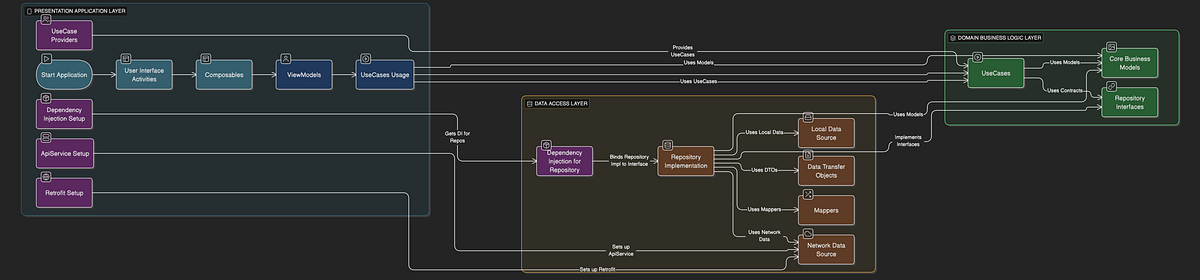
This graph shows a three-layer architecture for your Android app:
:app (Presentation/Application Layer): This is the top layer. It handles the UI (what the user sees and interacts with) and ViewModels. It uses “Use Cases” (business logic) from the :core-domain layer and gets its data-handling capabilities (like how to fetch images) through Dependency Injection, ultimately provided by the :core-data layer.
:core-data (Data Access Layer): This middle layer is responsible for all data operations. It implements the “Repository Interfaces” (contracts for data handling) defined in :core-domain. It contains the actual code for talking to the network, managing databases (if any), and converting data between network/database formats (DTOs) and the app’s internal “Domain Models.”
:core-domain (Domain/Business Logic Layer): This is the central layer and the heart of your app’s business rules. It defines the core data structures (“Domain Models” like Image), the contracts for how data should be fetched or saved (“Repository Interfaces”), and the specific business operations (“Use Cases” like GetImagesUseCase). This layer is pure Kotlin and doesn’t know about Android specifics, making it highly reusable and testable.
How they connect:
:app depends on :core-domain to know what business operations it can perform and what kind of data it will work with.
:app also depends on :core-data (via Hilt’s dependency injection) to get the actual implementations of how those data operations are done.
:core-data depends on :core-domain to know what contracts it needs to fulfill (by implementing the repository interfaces) and what data structures it needs to provide to the rest of the app.
💡 Takeaways
Separation of Concerns (SoC): This is the biggest win. Each module has a distinct responsibility, making the codebase easier to understand, navigate, and maintain.
Scalability: As the application grows, this modular structure makes it easier to add new features or modify existing ones without creating a tangled mess. New features can follow the same layered pattern.
Improved Build Times (Potentially): Gradle can cache unchanged modules. If you only change code in :app, Gradle might not need to recompile :core-domain or :core-data if their public API hasn’t changed, leading to faster incremental builds.
Team Collaboration: Different team members can work on different layers/modules more independently with fewer merge conflicts, as long as the interfaces (contracts in :core-domain) are agreed upon.
Enforces a Clean Architecture: This structure naturally guides you toward a cleaner, more robust architectural pattern, which is beneficial for long-term project health.
For the complete implementation and to explore the code in context, you can find the full project on GitHub: PinterestStyleGridDemo Repository
Thanks for reading! I hope you found this guide on modularizing Android app helpful.
If you enjoyed this, you'd love my other articles.
Subscribe to my free newsletter to get my latest tutorials and coding insights delivered directly to your inbox. No spam, ever. Unsubscribe at any time.
I'd also love to hear from you! What's your experience with modularizing the Android app? Let me know in the comments below 👇


